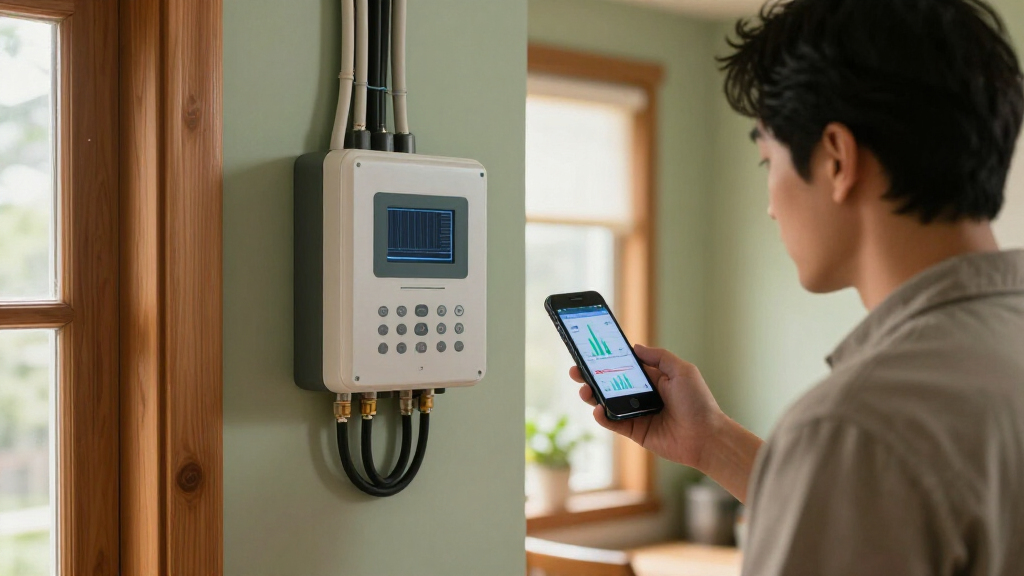

This checklist is for homeowners who want a clearer view of where electricity goes, whether they are starting with a single appliance or considering broader home monitoring. The picks include tools for whole-home measurement, panel-level control, plug-in tracking, and portable testing. Start with your monitoring goal so you can focus on the type of information you need.

Get backup power and energy gear delivered free — and shop member deals
- Fast, free delivery on millions of items
- Access to Prime Big Deal Days deals on October 6–7
- Prime Video, Amazon Music and more included
The sections move from whole-home and panel options to individual circuits and outlets, then cover portable and solar-related measurement. Some slots include a named product, while others offer guidance only. Match each option to its measurement scope before comparing features.
Use the checklist to confirm electrical compatibility, installation requirements, and the readings you expect to see. Check whether a device fits your panel, circuit, or outlet, and whether its connection method works in your home. Verify fit before buying, especially for equipment that connects to electrical wiring.
Whole-home energy monitor
A whole-home monitor is the broadest starting point in this checklist: it is intended to help you see energy use across the home rather than just at one outlet. The listed pick is the Eyedro 3-Phase Energy Monitor 200A/600V (Model EB6-EW-E3) – WiFi/Ether. Its name specifies three-phase monitoring and ratings of 200A/600V, so those details should guide your compatibility check. Confirm your service configuration before considering this model.
A common mistake is treating a monitor’s headline ratings as proof that it will suit a particular installation. Check your electrical service, conductor arrangement, available space, and the manufacturer’s installation instructions. If you are unsure about the wiring or whether the monitor supports your setup, consult a qualified electrician. Also check how readings are accessed and whether the WiFi or Ethernet connection options fit your home network. Review the connection and setup requirements in advance.
Think about what you want to learn: overall consumption trends, changes after adding equipment, or a foundation for more detailed monitoring. A whole-home device may not answer questions about every individual circuit on its own. Choose the scope that matches your questions, and verify the product’s exact capabilities before relying on it for a specific use.
What to look for:
- Confirm compatibility with your home’s phase configuration and electrical service.
- Compare your system’s ratings with the stated 200A/600V specification.
- Check installation instructions, conductor fit, and panel space.
- Verify WiFi or Ethernet setup requirements and network reach.
- Confirm which readings and monitoring features the model supports.
Eyedro 3-Phase Energy Monitor 200A/600V (Model EB6-EW-E3) – WiFi/Ethernet, Real-
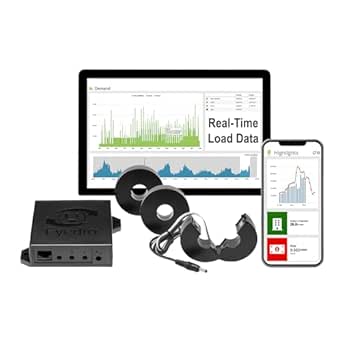
The Eyedro EB6-EW-E3 is a 3-phase energy meter with real-time monitoring of kWh, Watts, Amps, Volts, Power Factor, and cost. It installs non-invasively with split-core CT sensors (3x200A included), connects via 2.4 GHz WiFi or Ethernet, and supports solar/net metering with direction detection.
Pros:
- Non-invasive installation with split-core CT sensors — no wiring changes or special tools required
- Free cloud software with 24/7 data history, alerts, reports, and bill projections — no subscription fees
- Solar and net metering ready, differentiating generated vs. consumed power
- Dual connectivity options via 2.4 GHz WiFi or wired Ethernet
Cons:
- Full net metering with solar breakout requires a second EB6-EW-E3 unit
- European-style power adapter sold separately
- Setup requires configuration in the MyEyedro cloud platform
Best for: Homeowners seeking a broad view of energy use and whose electrical setup matches the monitor’s requirements.
Not ideal for: Homes with an incompatible service configuration or buyers seeking only plug-level tracking.
Bottom line: Check service compatibility and installation requirements before choosing this whole-home monitor.
Smart electrical panel
A smart electrical panel option belongs on the checklist when you want to consider monitoring or controlling electrical loads at the panel level. The listed pick is the IBox Matis MTS3 WiFi Circuit Breaker with 18-Way IP66 Waterproof Distr. The product name gives several details to investigate, including WiFi, an 18-way configuration, and an IP66 waterproof designation. Panel compatibility comes first: the name alone does not establish that it fits your existing equipment.
A frequent buying mistake is choosing a breaker or panel component based on a feature label without checking the exact panel model, electrical ratings, and installation rules. Confirm the product’s supported panel types, circuit arrangement, and intended environment in the manufacturer documentation. Ask a licensed electrician to assess fit and installation, especially if you are replacing or modifying panel equipment. Verify the specific panel match before purchase.
Consider whether a panel-level device addresses your actual need better than monitoring individual circuits or outlets. Check what information the WiFi connection provides, how setup works, and what the 18-way description means for your intended installation. The IP66 designation appears in the product name, but you should confirm the manufacturer’s stated use conditions rather than assume suitability for any location. Check the documented operating conditions for your setup.
What to look for:
- Confirm the exact panel and breaker compatibility in the product documentation.
- Check electrical ratings and the intended circuit arrangement.
- Clarify what the 18-way configuration means for your installation.
- Review WiFi setup and the monitoring or control functions provided.
- Have a qualified electrician assess installation and environmental suitability.
IBox Matis MTS3 WiFi Circuit Breaker with 18-Way IP66 Waterproof Distribution Bo

The IBox Matis MTS3 is a WiFi-enabled circuit breaker available in 20A, 32A, and 63A options. It features an 18-way IP66 waterproof distribution box, suitable for outdoor and industrial applications.
Pros:
- WiFi-enabled for remote control and monitoring
- IP66 waterproof rating suitable for outdoor use
- Available in multiple current ratings (20A, 32A, 63A)
Cons:
- Limited detailed specifications in the description
- No user reviews or ratings provided
- Potential complexity in installation for non-technical users
Best for: Homeowners exploring panel-level equipment whose panel and circuit needs match the product documentation.
Not ideal for: Buyers who cannot confirm panel compatibility or only need to monitor one appliance.
Bottom line: Treat the product name as a starting point and verify panel fit, ratings, and installation requirements.
Circuit-level power sensor
A circuit-level sensor can help focus monitoring on a particular branch circuit, which is useful when you want more detail than a whole-home total provides. No specific product is listed for this slot, so use the checklist to define what you need before comparing models. Identify the circuit you want to understand and the kind of readings that would make the information useful.
Common mistakes include assuming every sensor fits every panel, overlooking conductor size or routing, and expecting circuit readings to explain an appliance’s use when multiple loads share that circuit. Check supported electrical systems, current range, sensor dimensions, and installation instructions. If access to the panel or wiring is involved, have a qualified electrician evaluate the installation. Check sensor fit and circuit coverage before selecting a unit.
Think through how the sensor communicates, where its data is displayed, and whether it works with the monitoring system you plan to use. If your goal is to isolate one device, a plug-in monitor may be simpler when the device uses a compatible outlet and stays within its limits. For fixed wiring, prioritize documented compatibility and safe installation. Match the measurement method to the load, then compare options using the manufacturer’s specifications.
What to look for:
- Check supported electrical systems and the sensor’s current range.
- Confirm sensor dimensions and fit around the intended conductor.
- Verify whether one or multiple conductors or circuits are measured.
- Review communication, display, and system compatibility requirements.
- Follow installation guidance and use an electrician where appropriate.
Smart plug energy monitor
A smart plug energy monitor is a convenient checklist slot for tracking an individual compatible appliance through an outlet. The listed pick is the SONOFF S61s Matter Smart Plug, 15A Wi-Fi Outlet with Energy Monitoring. Its name identifies Matter, WiFi, a 15A rating, and energy monitoring; use those details as prompts to check your device and home setup. Confirm outlet and load compatibility before plugging in an appliance.
A common mistake is assuming that a plug fits every outlet or can be used with any load. Check the outlet type, the appliance’s electrical requirements, and the plug’s instructions, including any limits on the kind of equipment it supports. Also verify Matter and WiFi requirements, including whether your existing devices or network can complete setup. Check the full setup path before relying on app-based monitoring.
Smart plugs are best considered for a specific plug-connected load; they do not provide a whole-home picture. Decide which appliance you want to track and whether the readings and controls listed by the manufacturer answer your question. Check physical clearance around neighboring outlets and the plug’s placement requirements. Pick one clear monitoring target, then confirm the product’s supported features and electrical limits.
What to look for:
- Verify the outlet type and appliance requirements against the plug’s instructions.
- Check the stated 15A rating and any load restrictions.
- Confirm Matter and WiFi setup compatibility with your home devices.
- Review which energy readings and controls the product provides.
- Check outlet spacing and clearance for the plug body.
SONOFF S61s Matter Smart Plug, 15A Wi-Fi Outlet with Energy Monitoring, 4-Pack

The SONOFF S61s is a Matter-compatible Wi-Fi smart plug for controlling lamps, fans, heaters, and other household devices. It supports energy monitoring and electricity cost tracking through the eWeLink app or compatible Matter controllers.
Pros:
- Works with major Matter ecosystems, including Apple Home, Alexa, Google Home, and SmartThings
- Built-in energy monitoring and electricity cost tracking
- Supports a 15A load for common household appliances
- No hub required with direct 2.4GHz Wi-Fi setup
Cons:
- Uses 2.4GHz Wi-Fi setup, which may not suit 5GHz-only networks
- Maximum load is limited to 15A/1875W
- Energy tracking depends on app or Matter controller support
Best for: People who want to monitor a compatible plug-connected appliance.
Not ideal for: Those seeking whole-home or fixed-wiring circuit measurements.
Bottom line: Check the outlet, load limits, and Matter or WiFi requirements before using this plug.
Portable power meter
The portable power meter slot calls for careful attention to what the listed product actually measures. The pick is the ANCEL BA101 Car Battery Tester, 12V Digital Automotive Alternator Mete. Its name describes an automotive battery tester for 12V systems, rather than a general household electricity meter. Match the tool to its stated purpose before treating it as part of a home energy setup.
A common mistake is interpreting “power meter” as a universal description. Check the manufacturer’s documentation for supported battery types, testing functions, connection steps, and limits. Use it only for the applications described by the manufacturer, and follow its safety instructions when connecting to a vehicle battery. Verify the intended battery application before use.
If your goal is to measure household appliance consumption, compare tools explicitly described for that purpose, such as an appropriate smart plug monitor or a dedicated electrical meter. If you need an automotive check, confirm that your battery and vehicle match the tester’s supported specifications. Keep those two uses distinct when building your checklist. Choose by the measurement you need, not by a broad category label.
What to look for:
- Confirm the tester is intended for your 12V battery application.
- Check which battery types and testing functions are supported.
- Review connection steps and safety instructions.
- Verify the tool’s limits and supported vehicle or battery setup.
- For household consumption, choose a meter specified for that use.
ANCEL BA101 Car Battery Tester, 12V Digital Automotive Alternator Meter Diagnost

The ANCEL BA101 is a digital automotive battery tester designed for 12V batteries in cars, trucks, boats, RVs, and more. It provides quick, accurate readings of battery health, charge, voltage, and cranking system status, helping users identify issues early and prevent breakdowns.
Pros:
- Provides comprehensive battery health and performance readings
- Built-in protection features ensure safe testing
- Easy to use with one-handed operation and clear display
- Supports a wide range of 12V battery types and standards
Cons:
- Not compatible with lithium or non-12V batteries
- Limited to batteries above 30Ah, not suitable for small motorcycle batteries
- Requires correct input of battery type and rating for accurate results
Best for: Users checking a compatible 12V automotive battery or alternator.
Not ideal for: Homeowners looking for a meter to measure household appliance energy use.
Bottom line: The listed ANCEL model is an automotive battery tester, so confirm its intended use before adding it to a home energy checklist.
Solar production meter
A solar production meter can help you focus on electricity generated by a solar system, a different question from how much energy the home consumes. No product is listed for this slot, so start by checking what monitoring equipment your inverter or existing solar system already supports. Separate production from consumption when defining the readings you want.
A common mistake is buying a meter before checking the inverter, electrical configuration, and existing monitoring options. Confirm whether your system provides production data, how that data is accessed, and whether an additional device is compatible. If measurement requires access to fixed wiring or the solar equipment, follow the manufacturer guidance and involve a qualified electrician or solar professional. Check system compatibility first.
Decide whether you need total solar output, comparisons with household use, or another specific view. Those goals can require different monitoring arrangements, so compare documented features instead of relying on a generic “solar meter” label. Check the supported electrical setup, data display, communications, and installation method. Define the solar question clearly, then select equipment documented for your system.
What to look for:
- Check whether the inverter or solar system already provides production data.
- Confirm compatibility with the system’s electrical configuration.
- Clarify whether you need production readings, consumption readings, or both.
- Review data access, display, and communication requirements.
- Follow installation documentation and consult a qualified professional for fixed wiring.
Build your checklist in a practical order: first identify the measurement you need, then confirm compatibility and installation requirements, and only after that compare optional features. If one appliance is your main concern, check plug-based monitoring first; if you need broader visibility, examine whole-home or panel-level options. Prioritize fit and purpose before expanding your setup.
You do not need to monitor every circuit or device at once. Start with one clear question, verify that the chosen tool is designed to answer it, and add more detail only when it will help you make decisions. A focused first step can make home energy tracking easier to understand.
Fall Picks
fall essentials
As an affiliate, we earn on qualifying purchases.