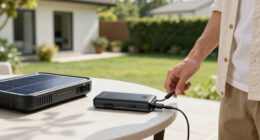

The best solar-powered laptop chargers pair a battery with laptop-class output — 60W or more over USB-C PD, or a real AC outlet — with a panel that can slowly refill it in the sun. After comparing nine options on output wattage, bundled panels, capacity, and battery chemistry, my top pick is the Portable Solar Power Bank with AC Outlet 65W, because it’s the only compact option here that bundles a 30W foldable panel, a 65W USB-C port, and an AC outlet in one kit. If you need to power a laptop for days rather than hours, the Jackery Explorer 1000 v2 is the premium pick, while the Takki Solar Generator is the simplest starting point for first-time buyers. The core tradeoff in this category is portability versus runtime: pocketable banks hold about one laptop charge and refill slowly, while power stations run everything but weigh far more. One honest warning before the picks — several products marketed as solar chargers top out at phone-level wattage, and I flag them clearly in the ranking below. Read on for the full breakdown, who each pick is for, and who should skip it.
Key Takeaways
- Wattage separated the winners from the also-rans: the SoaraiSe 48000mAh and YELOMIN 10000mAh banks carry big batteries but no laptop-class output, so they rank as phone and tablet picks despite their solar panels.
- The top pick won on bundling: the 65W power bank is the only compact option that includes a 30W foldable panel alongside USB-C PD and an AC outlet, so buyers don’t have to source a compatible panel separately.
- Solar input is a refill trickle, not a power source: even the best bundled panels here (21-30W) need most of a sunny day to refill their own batteries, and that reality shaped every ranking.
- Two of the nine products are near-identical 146Wh power stations sold under different listings; they landed back-to-back because port layout and day-to-day pricing are the only real differences.
- LiFePO4 chemistry justified the premium tier: the Jackery Explorer 1000 v2 and the DARAN station cost more per watt-hour but are rated for thousands of cycles, which matters for daily off-grid users and not for occasional emergency kits.


| solar-powered laptop charger | Battery Capacity | Ports | Extras | Weight |
|---|---|---|---|---|
| Portable Solar Power Bank with | 24,000mAh | — | — | — |
| SoaraiSe Solar Power Bank 4800 | 48,000mAh | 2x USB-A, 1x USB-C (input/output) | — | — |
| YELOMIN 10000mAh Solar Power B | 10,000mAh | 3 | 3-mode SOS flashlight, overcharge protection | — |
| Portable Power Station 146Wh 1 | 146Wh (39,600mAh) | — | Dual LED flashlight with multiple modes | 3.3 lbs |
| Takki Solar Generator 120W Pea | 88.8Wh | — | LED flashlight with SOS mode | 2.29 lbs |
| Portable Power Station 146Wh 1 | 146Wh (39,600mAh) | — | Dual LED flashlights | 3.3 lbs |
| FEELLE Solar Power Bank 50000m | — | USB-C in/out, USB-A out, Micro-USB in | — | — |
| Jackery Explorer 1000 v2 Porta | — | 3× AC, 2× USB-C, 1× USB-A, 1× 12V car port | App control; solar charging via Jackery panels (sold separately) | 23.8 lbs |
| DARAN Portable Power Station 8 | — | 2× AC, 2× USB-C, 2× USB-A, DC5521 | — | 2.54 lbs |
More Details on Our Top Picks
Portable Solar Power Bank with AC Outlet 65W, 24000mAh, Includes 30W Foldable Solar Panel
Among the five options here, this is the one I’d call the best overall solar laptop charger, because its 65W AC outlet can genuinely top up most ultrabooks — something the SoaraiSe 48000mAh, for all its capacity, simply can’t do without an AC port. The bundled 30W foldable panel means you’re not buying extras the way you would with the 146Wh Portable Power Station, and 24,000mAh covers roughly one full laptop charge plus phones. The tradeoffs are real: the AC outlet needs manual switching on, the panel’s junction box isn’t waterproof, and the 65W ceiling rules out gaming laptops or anything power-hungry. If your machine sips rather than gulps wattage, this hits the best balance of price, portability, and true laptop support in the lineup.
Pros:- 65W AC outlet charges most thin-and-light laptops directly, no adapters needed
- 30W foldable solar panel included, so it works as a complete kit out of the box
- AC, USB, and DC outputs cover a laptop, phone, and camera gear simultaneously
- Built-in battery management system guards against overcharging and short circuits
Cons:- AC output requires manual switching on each time — easy to forget and wonder why nothing is charging
- Solar panel’s junction box isn’t waterproof, limiting use in wet weather
- 65W ceiling excludes high-power laptops and appliances
Best for: Remote workers and campers who need to recharge an ultrabook or MacBook-class laptop off-grid without buying a separate solar panel
Not ideal for: Owners of gaming laptops or mobile workstations drawing over 65W — the AC outlet will refuse them, and rain-prone campers should note the panel’s junction box isn’t waterproof
- Battery Capacity:24,000mAh
- AC Output:65W
- DC Output:9V–12.6V / 10A max
- USB Output:5V/2.4A, up to 5V/3A or 9V/2A
- Solar Panel:30W foldable, included
- Power Bank Size:6.89 x 3.98 x 1.89 in
- Panel Size:12.7 x 8.4 x 0.3 in
Our verdict“The most balanced pick here for anyone whose laptop draws under 65W and who wants a complete panel-included kit.”
SoaraiSe Solar Power Bank 48000mAh Wireless Portable Charger with 4 Cables and Solar Panels
The SoaraiSe is the capacity king of this roundup at 48,000mAh — double the 24,000mAh of my Best Overall pick — and its four flip-out panels harvest sunlight faster than any single-panel kit here. Built-in cables and a wireless charging pad mean you can walk out the door with zero accessories. Here’s the catch for laptop buyers: there’s no AC outlet, and the USB output is tuned for phones and tablets, so most laptops are off the menu. Compared with the Takki Solar Generator, which at least gives you an 80W AC socket, this is a phone-and-tablet station wearing a solar suit. It’s also the bulkiest and priciest bank in the group. I’d point it at families or groups keeping many small devices alive on a long trip, not at anyone planning to work remotely on a laptop.
Pros:- 48,000mAh capacity keeps a family’s phones running for days
- Four solar panels refill the battery faster in sunlight than single-panel rivals
- Built-in cables plus wireless charging mean nothing extra to pack or lose
- 3A USB-C port handles fast charging for compatible phones
Cons:- No AC outlet and no laptop-class USB output, so it can’t serve as a true laptop charger
- Bulkiest option in the lineup due to the big battery and four panels
- Costs more than standard power banks with similar phone-charging ability
Best for: Families or groups on multi-day camping trips who need to keep several phones, tablets, and earbuds topped up without packing cables
Not ideal for: Laptop users — without an AC outlet or high-wattage USB-C PD output, most laptops simply can’t charge from it
- Battery Capacity:48,000mAh
- Solar Panels:4 fold-out panels
- Ports:2x USB-A, 1x USB-C (input/output)
- Wireless Charging:Yes
- Fast Charging:3A via USB-C
- Built-in Cables:4 integrated cables
Our verdict“The right call for groups charging lots of small devices — the wrong call if a laptop is the device that matters.”
YELOMIN 10000mAh Solar Power Bank with Foldable Solar Panels, Wireless Charging, and Built-in Cables
The YELOMIN is the smallest entry in this lineup, and I’d frame it honestly: it’s an emergency companion rather than a laptop charger in the true sense. The 10,000mAh cell holds barely a third of what the 24,000mAh AC power bank carries, so even if your laptop accepts a slow trickle from the built-in USB-C cable, you’re looking at a partial charge at best. What it does well is disappear into a daypack — four fold-out panels, built-in USB-C and Lightning cables, a 15W wireless pad, and an SOS flashlight, all sealed and bumpered for rough weather. Compared with the SoaraiSe 48000mAh it trades endurance for pocketability. Buy it as a lightweight safety net for phones and small gadgets; laptop users should look at the Takki or the 65W AC bank instead.
Pros:- Compact and light enough to live permanently in a daypack
- Built-in USB-C and Lightning cables plus a 15W wireless pad cover almost any phone
- Sealed ports and reinforced bumpers stand up to rain and drops outdoors
- SOS flashlight with multiple modes adds real emergency value
Cons:- 10,000mAh capacity runs dry fast and can’t meaningfully charge a laptop
- 15W wireless charging trails the faster pads on premium chargers
- Fold-out panels and integrated cables add bulk relative to the small battery they serve
Best for: Day hikers and minimalists who want a weather-sealed backup for a phone and one small gadget, with solar as a last-resort refill
Not ideal for: Anyone expecting meaningful laptop runtime — 10,000mAh won’t come close to filling a laptop battery, and there’s no AC output
- Battery Capacity:10,000mAh
- Power Source:Solar + corded electric
- Ports:3
- Wireless Charging:15W
- Built-in Cables:USB-C, Lightning
- Extras:3-mode SOS flashlight, overcharge protection
- Battery Cell:Lithium Ion
Our verdict“A smart ultralight safety net for phones — laptop buyers should size up to a model with an AC outlet.”
Portable Power Station 146Wh 100W Solar Generator with AC Outlet, Emergency Backup for Home & Outdoors
This 146Wh station is my pick for home backup that moonlights outdoors. With 100W of AC output across two outlets it handles almost any laptop with headroom the 80W-limited Takki can’t match, and at 3.3 lbs it’s still easy to carry to a campsite. The catch: no solar panel in the box, so the ‘solar’ half of this roundup costs extra here — unlike the Takki and the 65W power bank, which bundle panels. Recharging via wall AC or a car port is simple; going genuinely off-grid means a second purchase. Capacity sits in a useful middle ground: nearly double the Takki’s 88.8Wh, though far short of the Jackery Explorer 1000 v2 elsewhere in this guide. If you want one box that covers a laptop, a router, and a light during outages, and you’re willing to add a panel later, this is the sensible step up.
Pros:- 100W AC output covers virtually any laptop with room to spare
- Two AC outlets plus USB and DC ports run several devices at once
- Recharges three ways: wall AC, car, or solar panel
- Light for its class at 3.3 lbs, with dual LED flashlights for outages
Cons:- Solar panel not included, raising the true cost of off-grid use
- 100W cap rules out larger appliances like kettles or hair dryers
- 146Wh drains quickly if you run multiple devices for long stretches
Best for: Households wanting a grab-and-go outage kit that keeps a laptop, modem, and lamp running, with solar added down the line
Not ideal for: Buyers who want solar charging on day one without extra spending — the panel is a separate purchase, unlike the bundled kits here
- Battery Capacity:146Wh (39,600mAh)
- AC Output:100W, 110V
- AC Outlets:2
- Recharge Options:AC wall, car, solar (panel sold separately)
- Weight:3.3 lbs
- Dimensions:7.6 x 3.7 x 6.1 in
- Extras:Dual LED flashlight with multiple modes
- Battery Cell:Lithium Ion
Our verdict“The most practical choice for outage-proofing a laptop setup, provided you budget for the missing solar panel.”
Takki Solar Generator 120W Peak Portable Power Station with 21W Solar Panel and 88.8Wh Battery
The Takki is where I’d send a first-time buyer. It’s the lightest laptop-capable option here at 2.29 lbs, the 21W panel comes in the box — something the 146Wh Portable Power Station doesn’t include — and wall charging hits 80% in about two hours, so it’s forgiving if you forget to prep before a trip. The limits are honest ones: an 80W continuous ceiling means ultrabooks and Chromebooks only, and running devices while the unit itself recharges isn’t recommended, which the 65W AC power bank handles more gracefully. Solar refills are slow at five to seven hours to 80%. Against the bigger stations it’s outgunned, but as an affordable, complete starter kit for weekend camping with a light laptop, nothing else in this lineup is as easy to live with.
Pros:- Lightest laptop-capable unit here at 2.29 lbs, plus a 0.92 lb panel
- 21W solar panel included, so it’s a full kit at a low entry price
- Fast wall recharge: about 2 hours to 80%
- Built-in LED flashlight with SOS mode for campsite and emergency use
Cons:- 80W continuous limit excludes many mainstream and all performance laptops
- Pass-through use (charging devices while the unit recharges) isn’t recommended
- Solar refills take 5–7 hours to reach 80%, demanding all-day sun
Best for: First-time solar buyers and weekend campers who want a complete, featherweight kit for a Chromebook or ultrabook without extra purchases
Not ideal for: Power users who need to run devices while recharging the unit, or anyone whose laptop draws more than 80W
- Battery Capacity:88.8Wh
- Power Output:80W rated, 120W peak
- Weight:2.29 lbs
- Dimensions:5.7 x 4.13 x 3 in
- Solar Panel:21W foldable, included (0.92 lbs)
- AC Recharge Time:~2 hours to 80%
- Solar Recharge Time:5–7 hours to 80%
- Extras:LED flashlight with SOS mode
Our verdict“The easiest and most affordable way to start charging a light laptop from the sun, as long as 80W is enough.”
Portable Power Station 146Wh 100W Solar Powered Power Bank with AC Outlet
If you want a real AC outlet for a laptop without spending Jackery money, this 146Wh station is where I’d start. The 100W output covers most ultrabooks and MacBooks comfortably, and 146Wh translates to roughly one to two full laptop charges — enough for a weekend of light remote work. Compared with the DARAN station, you get about 60% more capacity for a small weight penalty, though the DARAN’s LiFePO4 cells will outlast this unit’s lithium-ion pack by years. The honest tradeoffs: the solar panel costs extra, so the solar part of the pitch is an add-on, and the 100W ceiling rules out gaming laptops or anything that spikes under load. I’d call it the sensible middle ground between pocket power banks and the Jackery Explorer 1000 v2.
Pros:- Two AC outlets and seven ports cover a laptop plus peripherals at once
- 3.3 lbs is genuinely carryable for car camping and blackout duty
- Four recharge paths — AC, car, USB-C, solar — keep it flexible
- Dual LED flashlights with multiple modes for emergencies
Cons:- Solar panel not included, so off-grid use requires an extra purchase
- 100W output ceiling excludes gaming laptops and high-draw appliances
- Standard lithium-ion cells won’t age as well as the LiFePO4 packs in the DARAN or Jackery
Best for: Weekend campers and remote workers who want a genuine AC outlet for a laptop without paying premium power-station prices
Not ideal for: Anyone running gaming laptops or 100W-plus gear — and buyers who expect the solar panel in the box, since it costs extra
- Battery Capacity:146Wh (39,600mAh)
- AC Output:100W
- AC Outlets:2
- Total Ports:7
- Recharging:AC, car, USB-C, or solar (panel sold separately)
- Voltage:110V
- Battery Type:Lithium-ion
- Weight:3.3 lbs
- Extras:Dual LED flashlights
Our verdict“The right first power station for laptop users who want AC power outdoors at the lowest reasonable spend.”
FEELLE Solar Power Bank 50000mAh Portable Charger with Hand Crank, Magnetic Wireless Charging, and Solar Panels
I’ll be straight about this one: despite sitting in a laptop-charger roundup, the FEELLE is really a phone-and-tablet survival tool. Its USB output can top up a laptop in a pinch, but with 15W wireless as the headline rate and no AC outlet, it can’t feed a MacBook the way the 146Wh power station or the DARAN can. What it does better than either is endurance per dollar — 50,000mAh, four fold-out solar panels, a hand crank for true last-resort power, and a shell that’s shockproof, dustproof, and waterproof. Compared with the SoaraiSe bank, the crank and magnetic wireless pad give it a wider safety net. The tradeoffs are real: solar here is a trickle, the crank is strictly for emergencies, and thicker phone cases can weaken the magnetic charge.
Pros:- 50,000mAh keeps phones and small devices going for days
- Hand crank plus four solar panels provide true last-resort recharging
- Magnetic 15W wireless charging and four built-in cables cut cable clutter
- Shockproof, dustproof, and waterproof build survives real trail abuse
Cons:- No AC outlet and modest USB output make it a weak laptop charger
- Solar and crank charging are emergency-slow, not primary refuels
- Wireless pad struggles through thicker phone cases
Best for: Emergency-kit builders and multi-day hikers whose priority is keeping phones, tablets, and lights alive indefinitely off-grid
Not ideal for: Laptop-first users — with no AC outlet and modest USB output, it’s a trickle charger for anything bigger than a tablet
- Capacity:50,000mAh
- Wireless Charging:15W max, magnetic
- Built-in Cables:USB-C, phone cable, Micro-USB, USB-A
- Solar:4 fold-out panels
- Ports:USB-C in/out, USB-A out, Micro-USB in
- Emergency:Hand crank + 3-mode flashlight (steady, SOS, strobe)
- Durability:Shockproof, dustproof, waterproof silicone/ABS+PC shell
Our verdict“Buy it as an unkillable backup for small devices, not as your main laptop power source.”
Jackery Explorer 1000 v2 Portable Power Station, 1070Wh, 1500W, Fast Charge, LiFePO4 Battery, USB-C Output, Solar Generator
This is the pick I’d make when a laptop is only part of the load. With 1,070Wh and a 1,500W pure sine wave output, the Explorer 1000 v2 runs a full mobile workstation — laptop, monitor, even a mini-fridge — for hours, where the 146Wh station and the DARAN tap out after a charge or two. The LiFePO4 pack is rated for a decade of use, and the one-hour wall recharge means you’re rarely waiting on it between trips. The compromises: at 23.8 lbs it’s car camping, not backpacking; the solar panels are sold separately and Jackery-only; and the fastest charging mode runs through the companion app. Per watt-hour it undercuts buying several smaller units — but only if you’ll actually use this much power.
Pros:- 1,070Wh and 1,500W run a full workstation, not just a laptop
- LiFePO4 battery rated for 10+ years of service
- One-hour fast wall charging minimizes downtime between trips
- Three pure sine wave AC outlets plus USB-C cover everything at once
Cons:- Solar panels cost extra and only Jackery panels are supported
- 23.8 lbs — portable by handle, not by backpack
- Fastest charging mode requires the companion app
Best for: RV travelers, van-lifers, and home-backup buyers powering a full workstation or small appliances through long outages
Not ideal for: Solo hikers and anyone counting ounces — at 23.8 lbs before panels, it’s overkill for charging a single laptop
- Capacity:1,070Wh
- AC Output:1,500W (3,000W surge)
- Battery:LiFePO4, 10+ year lifespan
- Fast Charge:Full recharge in about 1 hour
- Ports:3× AC, 2× USB-C, 1× USB-A, 1× 12V car port
- Weight:23.8 lbs
- Extras:App control; solar charging via Jackery panels (sold separately)
Our verdict“The one to buy when your laptop shares power with bigger gear and you want a decade of service.”
DARAN Portable Power Station 89.6Wh LiFePO4 Battery with 100W Output and Fast Charging
The DARAN is the one I’d toss in a daypack. At 2.54 lbs and smaller than a hardcover, it undercuts even the 146Wh station on portability while still offering two AC outlets — something the FEELLE bank can’t match at all. The LiFePO4 battery rated for 3,500+ cycles is the quiet advantage here: it should outlive the lithium-ion 146Wh unit by years of regular use. Capacity is the sacrifice. At 89.6Wh you’re getting one laptop charge, maybe one and a half, so it’s a day-trip companion and short-outage bridge rather than a weekend solution like the Jackery Explorer 1000 v2. Also note the 100W limit, the separately sold solar panel, and the full charge/discharge break-in the maker asks for before first use.
Pros:- 2.54 lbs — the lightest true AC-outlet option in this lineup
- LiFePO4 cells rated for 3,500+ cycles outlast cheaper lithium-ion rivals
- 0–80% recharge in 1.5 hours via wall or USB-C PD
- Six output ports including two AC sockets
Cons:- 89.6Wh is the smallest capacity here — about one laptop charge
- 100W output cap rules out power-hungry laptops
- Solar panel sold separately, and it wants a full break-in cycle before first use
Best for: Day hikers, commuters, and minimalists who want an AC outlet and years of battery life in a package that disappears into a daypack
Not ideal for: Multi-day off-gridders — 89.6Wh runs dry after about one laptop charge, and the solar panel is sold separately
- Capacity:89.6Wh
- Output:100W (200W peak)
- Battery:LiFePO4, 3,500+ cycles
- Ports:2× AC, 2× USB-C, 2× USB-A, DC5521
- Recharging:AC, USB-C PD, car, or solar (panel sold separately)
- Charge Speed:0–80% in 1.5 hours
- Weight:2.54 lbs
- Dimensions:6.5 × 3.3 × 4 in
Our verdict“The grab-and-go choice for laptop users who value low weight and long battery life over raw capacity.”

How We Picked
I evaluated all nine chargers through one lens: how well each one actually keeps a laptop running off-grid. That meant weighing output wattage first (a laptop needs 45-65W at minimum, so ports capped at phone-level speeds were marked down no matter how large the battery), then solar input realism (the panel wattage included in the box and how long a refill takes in decent sun), then capacity in watt-hours against carry weight, port selection, battery chemistry and cycle life, and finally price against everything above. Products that bundle their own panels scored higher than panel-sold-separately options at the same tier, since mismatched third-party panels are a common failure point for buyers.
The ranking follows that logic visibly. The 65W power bank sits at the top because it’s the best balance of laptop-ready output, included panel, and carry weight. High-capacity banks without laptop-class ports (SoaraiSe, YELOMIN) rank lower despite their mAh numbers, and their entries say so plainly. The two 146Wh stations sit mid-table as strong value picks with near-identical hardware, the LiFePO4 units earn their spots on longevity, and the Jackery ranks where it does because its capability is real but its price and roughly 24-pound weight only make sense for a specific buyer.
Factors to Consider When Choosing Solar-powered Laptop Chargers
The product entries above cover what each charger does well. This section covers the judgment calls behind them: the wattage math that decides whether your laptop charges at all, what solar panels can realistically deliver, and the mistakes that lead buyers to pack the wrong gear.
Check Output Wattage Before Anything Else
Every laptop has a minimum input it will accept, and falling short means the battery icon stays dark no matter how big the power bank is. Most ultrabooks want 45W over USB-C PD, mainstream laptops want 65W, and performance machines ask for 90-140W. This is where mAh marketing misleads: a 48,000mAh bank sounds enormous, but if its ports top out at 15-20W it will charge your phone five times and your laptop zero times. Check your laptop’s original wall adapter for its wattage, then buy a charger that meets or beats that number on at least one port. An AC outlet is the universal fallback, since you can plug in your own brick, though the inverter wastes roughly 10-15% of the battery as heat. The most common mistake in this category is buying capacity first and wattage second — do it the other way around.
Treat Solar as a Refill Trickle, Not a Power Source
Solar panels almost never deliver their rated wattage. A 30W foldable panel in good midday sun typically produces 18-24W in real conditions, and morning light, haze, or a bad angle cuts that further. Against an 88Wh battery, that means most of a clear day for a full refill — decent for camping, useless for a lunch-break top-up. The tiny integrated panels built into pocket-sized banks are slower still, often needing several days of sun for a full charge, so treat them as emergency lifelines rather than daily fuel. The right mental model is simple: the battery powers your laptop, the panel refills the battery, slowly. Leave home with a full charge, use the panel to stretch your runtime, and size up to a 60-100W panel only if you regularly spend multiple sunny days off-grid. Buyers who skip this math are the ones leaving one-star reviews.
Match Capacity to Your Trip, Measured in Watt-Hours
Capacity is marketed in mAh, but the number that matters is watt-hours (Wh), because it maps directly onto your laptop’s battery. A typical laptop holds 50-70Wh, and conversion losses eat 15-25% of any power bank’s stored energy on the way out. So an 88Wh station delivers roughly one full laptop charge, a 146Wh station delivers about two, and the Jackery’s 1070Wh covers a laptop plus phones and lights for a long weekend. Weight climbs just as fast: pocket banks run under two pounds, small stations three to four, and the Jackery is about 24. Flyers get one more constraint — the 100Wh carry-on ceiling — which the 88-89Wh picks were clearly designed to squeeze under. Match the battery to your longest realistic stretch away from an outlet, then add a 30% buffer, instead of buying the biggest number on the page.
Battery Chemistry Decides How Long the Charger Lives
Two battery chemistries dominate this category, and they age very differently. Standard lithium-ion packs are rated for roughly 500-800 charge cycles before capacity fades, which is fine for a charger you use a dozen times a year. LiFePO4 packs, found here in the Jackery and the DARAN, are rated for 3,000 cycles or more and tolerate heat and deep discharges better, which is why they cost more per watt-hour. If you’ll cycle the charger weekly — van life, daily fieldwork, regular camping — LiFePO4 is the cheaper option over five years even at the higher sticker price. If the charger lives in a closet for blackouts and comes out twice a year, standard lithium-ion is the sensible buy and the premium is wasted. Either way, store the battery around 50-80% charge and top it up every few months, since full batteries degrade faster on the shelf.
Pay for Outputs Your Laptop Can Use, Not Gadgets
Port selection decides how gracefully a charger fits your kit. An AC outlet is the most flexible single feature because it runs any laptop brick, camera charger, or small appliance, while USB-C-only units lock you into whatever wattage their ports negotiate. Pass-through charging — the ability to refill the battery from a panel while it powers your laptop — is the feature that turns a sunny afternoon into actual work time, and not every unit handles it well. Built-in cables and wireless pads are genuinely handy for phones and earbuds, but they add cost and failure points without helping a laptop at all. The FEELLE’s hand crank belongs in the same bucket: wonderful in a blackout, irrelevant at a campsite workstation. Pay for the outputs your laptop can use first, and treat everything else as a bonus rather than a reason to buy.
Frequently Asked Questions
Can a solar panel charge a laptop directly, without a battery in between?
Not in any way you’d want to rely on. A laptop expects stable, negotiated power, and a raw panel’s output swings every time a cloud crosses or the angle shifts, which can interrupt charging or trigger the laptop’s protection circuits. Every product in this roundup solves it the same way: the panel refills an internal battery, and the battery delivers clean, steady power to the laptop. That buffer is also why panel size matters less than buyers expect — a bigger panel fills the battery faster, but the battery is still doing the actual charging. If you see a panel advertised as charging laptops directly, read it as a panel with a battery attached.
How many watts does a solar charger need to charge my laptop?
Check the label on your laptop’s own wall adapter — that wattage is your target. Most thin-and-light laptops ship with 45-65W adapters, and any charger on this list with a 65W USB-C PD port or an AC outlet will run them at full speed. Larger machines are the exception: a 16-inch MacBook Pro or a gaming laptop wants 96-140W, and only the AC-outlet picks here (using your original brick) come close, with the gaming crowd better served by a bigger power station entirely. Buying a port with more watts than your laptop draws doesn’t charge it faster — the laptop negotiates only what it needs. The failure mode to avoid is the reverse: a 20W port on a 65W laptop, which either refuses to charge or drains slower than the screen burns power.
How long does it take to recharge these with a solar panel?
Longer than the marketing suggests, and it depends on both the panel and the battery size. A handy rule: divide the battery’s watt-hours by half the panel’s rated watts to get realistic hours of good sun. For the top pick’s 30W panel and roughly 89Wh battery, that’s about six peak hours — one long, well-aimed day. The Takki’s 21W panel against its 88.8Wh battery lands in the same range, while the integrated panels on the SoaraiSe and YELOMIN banks stretch into days, which is why I treat those as emergency-only solar. Winter sun, shade, and flat panel angles can double every one of these numbers, so plan around the conservative end.
Can I take a solar laptop charger on a plane?
Anything under 100Wh flies in your carry-on without special permission, which covers most of this list: the 65W power bank (about 89Wh), the Takki (88.8Wh), and the DARAN (89.6Wh) were clearly designed to sit just under that line. The two 146Wh stations fall into the 100-160Wh band that requires airline approval, and carriers typically limit you to two such batteries. The Jackery Explorer 1000 v2, at 1070Wh, can’t fly at all — it’s a road-trip and home-backup unit only. Lithium batteries always go in the cabin, never in checked luggage, and tape over exposed terminals if the battery rides loose in a bag. If air travel is your main use case, filter this list to the sub-100Wh picks before comparing anything else.
Is a solar power bank or a power station better for working outdoors?
It comes down to how many laptop-hours you need between wall outlets. A 65W-class power bank holds roughly one laptop charge, weighs under two pounds, and fits in a backpack — right for day trips, café overflow, and flights. A power station holds two to twelve laptop charges, runs AC gear and camera batteries, and anchors multi-day camping or blackout duty, but even the small ones triple the weight, and the Jackery is carry-with-two-hands territory. Solar behavior is similar across both, since panels refill either kind of battery at the same slow pace. My rule of thumb: if you’d carry it all day, buy the bank; if it lives in a car or a cabin, buy the station. Buyers in the middle — weekend campers with one laptop — are exactly who the 146Wh picks were built for.
Conclusion
If you want one answer: the Portable Solar Power Bank with AC Outlet 65W is my best overall pick because it’s the only compact kit here that pairs laptop-class USB-C output, an AC outlet, and a bundled 30W panel at a sane price. Value buyers should take either 146Wh power station — they’re near-identical hardware, so buy whichever is cheaper the day you order. For first-time buyers, the Takki Solar Generator is the gentlest starting point: panel in the box, simple display, nothing to configure. Daily off-grid users and van-lifers should pay up for the Jackery Explorer 1000 v2, since its LiFePO4 pack is the only one here built for thousands of work cycles, while minimalist travelers who want LiFePO4 in a lighter shell get the DARAN. Building an emergency kit? The FEELLE’s hand crank and huge reserve beat faster chargers that die with the grid, and phone-heavy households get the SoaraiSe. And commuters who just want a topped-up laptop should skip solar entirely and buy a plain 65W power bank — the sun is the slowest way to fill a battery, and every pick on this list works best when it leaves home full.