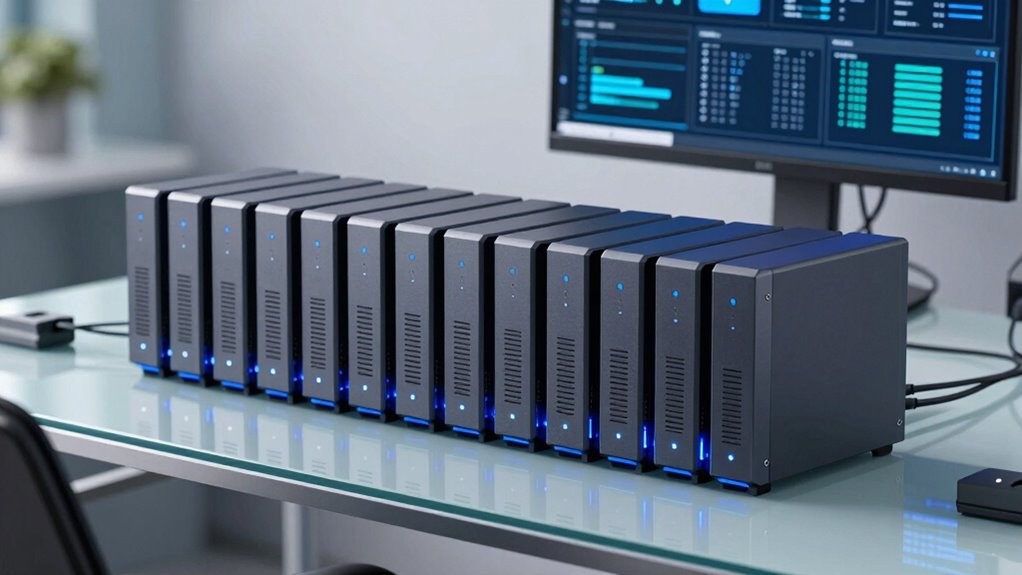

Choosing the right UPS for your NAS in 2026 involves balancing power capacity, runtime, compatibility, and additional features. The UGREEN NAS UPS US3000 stands out for its seamless integration with select UGREEN NAS models, offering quiet operation and intelligent shutdown. The WALLECUBE NAS UPS impresses with its eco-friendly LiFePO₄ battery and remote app management, making it ideal for long-term use. Meanwhile, the APC BE650G1 remains a reliable, affordable choice for basic home or office backup needs. Each of these options makes tradeoffs in power, runtime, or complexity, so understanding their differences helps match the right UPS to your specific setup.

Get backup power and energy gear delivered free with Prime
- Fast, free delivery on millions of items
- Prime Video, Amazon Music and more included
- Member-only deals all year
Key Takeaways
- The UGREEN NAS UPS US3000 offers a compact design with intelligent shutdown, but its limited compatibility and runtime suit specific models.
- WALLECUBE provides a long-lasting LiFePO₄ battery and remote management, making it an eco-friendly choice for moderate loads.
- APC BE650G1 balances affordability and reliability, though it offers less runtime and fewer advanced features.
- Power capacity and runtime are often inversely related; choose based on your NAS’s power draw and backup duration needs.
- Compatibility and ease of setup vary, so verify your NAS model and desired management features before selecting a UPS.
| UGREEN NAS UPS US3000, 120W DC and 12000mAh Battery Backup |  | Best Overall NAS UPS for Compact, Intelligent Power Support | Compatibility: DXP2800, DXP4300 Plus, DXP4800, DXP4800 Plus, DXP480T Plus | Connector Type: Used on Cable USB | Wattage: 120 watts | VIEW ON AMAZON | See Our Full Breakdown |
| WALLECUBE NAS UPS Compatible with Synology, Ugreen, TerraMaster, QNAP – 150W DC Uninterruptible Power Supply with Remote App Control for NAS and Mini PC |  | Best Eco-Friendly Long-Lasting UPS for NAS and Mini PCs | Voltage: 12 volts | Amperage: 10 A | Battery Charge Time: 4 hours | VIEW ON AMAZON | See Our Full Breakdown |
| APC Battery Backup 650VA/390W Uninterruptible Power Supply for PC, BE650G1 |  | Best Budget-Friendly UPS for Basic NAS and Office Devices | Capacity: 650VA/390W | Outlets: 8 (4 backup + surge, 4 surge-only) | Surge Energy Rating: 340 Joules | VIEW ON AMAZON | See Our Full Breakdown |
| UGREEN NAS UPS US2000 72W DC Battery Backup and Surge Protector |  | Best Compact Backup for Specific UGREEN NAS Models | Battery Capacity: 6000mAh | Wattage: 72W | Compatibility: Designed for UGREEN NAS DH2300, DH4300 Plus | VIEW ON AMAZON | See Our Full Breakdown |
| APC UPS 600VA/330W Battery Backup for Computer, Router, NAS |  | Best Low-Cost Backup for Basic Home and Office Devices | Capacity: 600VA/330W | Runtime: 23 minutes at 100W | Outlets: 5 with backup, 2 surge-only | VIEW ON AMAZON | See Our Full Breakdown |
More Details on Our Top Picks
UGREEN NAS UPS US3000, 120W DC and 12000mAh Battery Backup
The UGREEN NAS UPS US3000 stands out for its tailored compatibility with select UGREEN NAS models, providing a reliable, quiet backup during outages. It features a 120W DC output and a substantial 12000mAh battery that offers around 10 minutes of runtime—enough for safe shutdowns. Its integration with app controls and safety protections makes it highly convenient for users who prioritize data security. Compared with larger units, this model’s compact size makes it ideal for home or small office setups, but its specialized compatibility limits its use with other NAS brands or higher power models.
Pros:- Seamless integration with select UGREEN NAS models
- Quiet operation and compact design
- Includes intelligent shutdown and restart features
- Multiple safety protections for hardware safety
Cons:- Limited to specific UGREEN NAS models
- Battery runtime of approximately 10 minutes
- Not compatible with higher-power NAS models
Best for: Owners of compatible UGREEN NAS models seeking a quiet, easy-to-manage backup solution.
Not ideal for: Users with non-UGREEN NAS devices or those needing longer backup durations.
- Compatibility:DXP2800, DXP4300 Plus, DXP4800, DXP4800 Plus, DXP480T Plus
- Connector Type:Used on Cable USB
- Wattage:120 watts
- Form Factor:Compact
- Battery Capacity:12000mAh
- Power Output:120W DC
Our verdict“A highly effective choice for UGREEN NAS owners needing a compact, reliable backup, but less suited for broader compatibility or extended outages.”
WALLECUBE NAS UPS Compatible with Synology, Ugreen, TerraMaster, QNAP – 150W DC Uninterruptible Power Supply with Remote App Control for NAS and Mini PC
The WALLECUBE NAS UPS makes an appealing choice for those seeking longevity and remote management. Its LiFePO₄ battery offers over 3,000 charge cycles, making it highly durable and eco-friendly. Instant backup switching under 1ms minimizes data loss risks, while the remote app allows monitoring and control from anywhere. It supports up to 150W, making it suitable for most NAS models and mini PCs, though its runtime of around 2 hours under typical load may not suffice for prolonged outages. Its compact, silent profile suits home office environments but limits support for high-power devices.
Pros:- Long-lasting LiFePO₄ battery with over 3,000 charge cycles
- Instant backup switch under 1ms
- Remote app control for monitoring and management
- Eco-friendly with durable battery design
Cons:- Limited to 150W output, unsuitable for high-power devices
- Runtime of only 2 hours under typical load
- Requires 4 hours to fully charge
Best for: Tech-savvy users needing eco-friendly, long-lasting backup with remote management capabilities.
Not ideal for: Power-hungry setups exceeding 150W or those requiring extended backup durations.
- Voltage:12 volts
- Amperage:10 A
- Battery Charge Time:4 hours
- Form Factor:Stand Alone
- Maximum Power:150 watts
- Runtime:2 hours
Our verdict“An excellent choice for users prioritizing eco-friendliness, remote control, and moderate power needs, though limited by runtime and capacity.”
APC Battery Backup 650VA/390W Uninterruptible Power Supply for PC, BE650G1
The APC BE650G1 remains a staple for users seeking reliable power backup without extra bells and whistles. Its 650VA/390W capacity comfortably supports small NAS units, routers, and computers for up to 22 minutes at 100W load, providing ample time for safe shutdowns. The user-replaceable battery extends the lifespan, but it does mean purchasing a separate RBC17 battery. Its straightforward design and wall-mount options make it accessible for most home or small office environments. However, it lacks advanced features like LCD displays or network management, limiting oversight and customization.
Pros:- Reliable backup for small NAS and office electronics
- User-replaceable battery for longevity
- Multiple outlets with surge protection
- Compact, wall-mountable design
Cons:- Limited backup time of up to 22 minutes at 100W
- Requires separate purchase for replacement batteries
- No advanced management features or LCD display
Best for: Budget-conscious users looking for reliable basic backup for NAS and essential electronics.
Not ideal for: Heavy or high-power NAS setups requiring longer backup durations or advanced management features.
- Capacity:650VA/390W
- Outlets:8 (4 backup + surge, 4 surge-only)
- Surge Energy Rating:340 Joules
- Battery Type:User-replaceable RBC17
- Warranty:3 years
- Protection:$75,000 Equipment Protection
Our verdict“A dependable, affordable option for basic NAS protection, though limited in runtime and advanced control features.”
UGREEN NAS UPS US2000 72W DC Battery Backup and Surge Protector
The UGREEN NAS UPS US2000 offers a simple, effective power support tailored for certain UGREEN NAS models. Its 6000mAh battery provides enough backup to prevent data loss during brief outages. With surge protection and automatic restart features, it minimizes interruption and hardware risk. Its compact, quiet design makes it well-suited for home environments, but it is limited by its focus on specific models, which reduces flexibility for broader NAS compatibility. It’s best for users with compatible UGREEN NAS units who want a straightforward solution.
Pros:- Provides effective backup for compatible UGREEN NAS
- Automatic restart after power restoration
- Multiple safety protections
- Quiet and compact design
Cons:- Limited compatibility with non-UGREEN devices
- Battery capacity limits runtime and support for high loads
- Requires app setup for advanced features
Best for: Owners of specific UGREEN NAS models needing a compact, reliable power backup.
Not ideal for: Users with other NAS brands or those needing longer runtime or higher capacity.
- Battery Capacity:6000mAh
- Wattage:72W
- Compatibility:Designed for UGREEN NAS DH2300, DH4300 Plus
- Protection Features:Surge, over-charge, over-current, short-circuit
- Built-in Features:Intelligent processor, automatic restart, app notifications
Our verdict“A targeted, reliable backup for specific UGREEN NAS models, but not suited for broader or high-demand setups.”
APC UPS 600VA/330W Battery Backup for Computer, Router, NAS
The APC UPS 600VA/330W offers a straightforward solution for keeping essential electronics alive during outages. With 23 minutes of runtime at 100W, it provides enough pause for safe shutdowns. Its surge protection and USB port add convenience, while the easy-to-replace batteries help keep long-term costs down. This unit is best for users with modest power needs, such as small NAS units, routers, and computers, but it falls short if you require longer backup times or advanced management features like network monitoring or LCD displays.
Pros:- Provides sufficient backup for small NAS and peripherals
- Surge protection safeguards connected devices
- Easy battery replacement
- Affordable with simple setup
Cons:- Limited runtime at higher loads
- Battery replacement requires purchasing separate batteries
- Lacks advanced features like network management
Best for: Home users or small office environments needing basic backup for NAS and peripherals.
Not ideal for: High-power setups or those requiring extensive runtime and remote management.
- Capacity:600VA/330W
- Runtime:23 minutes at 100W
- Outlets:5 with backup, 2 surge-only
- USB Port:1.5A
- Battery Type:Replaceable
- Protection:Surge and noise filtering
Our verdict“A cost-effective backup option for basic needs, suitable for small setups but limited in runtime and control features.”
How We Picked
Our selection process focused on UPS units that are specifically suitable for NAS systems, prioritizing reliability, runtime, compatibility, and safety features. We looked at models with dedicated power output for NAS, considering their ability to protect data and hardware during outages. Durability, ease of management (such as app control), and physical size also influenced rankings, along with user reviews and technical specifications. We aimed to present options across different price points and feature sets, ensuring each pick serves a clear role for different types of buyers.
Factors to Consider When Choosing Ups For Nas
When selecting a UPS for your NAS, it’s vital to consider power capacity, runtime, compatibility, and management features. The right UPS not only protects your data but also fits your setup size and usage patterns. Understanding your NAS’s power draw and the typical outage duration helps narrow your options, while features like remote management and safety protections add valuable peace of mind. Balancing these factors ensures you choose a unit that safeguards your data without overspending or complicating your setup.
Power Capacity and Runtime
The first step is to determine your NAS’s power consumption—usually listed in its specifications—and select a UPS with at least 20-30% overhead. Runtime depends on capacity; smaller units like the APC BE650G1 provide up to 22 minutes at 100W, suitable for safe shutdowns. Larger or higher-capacity models offer longer backup but come at higher cost and size. Matching capacity to your needs prevents underperformance or unnecessary expense.
Compatibility and Safety Features
Ensure the UPS supports your NAS model, especially if it has specific power or connection requirements. Many units offer surge protection, automatic shutdown, and safety protections against overcurrent or short circuits—features that safeguard your hardware and data. For specific NAS brands, like UGREEN, choose models with tailored compatibility. For others, universal units with adjustable settings work well.
Management and Additional Features
Remote control via apps, LCD displays, and network management capabilities can make a significant difference in monitoring your UPS. If you value real-time status updates or remote power cycling, look for units that include these features. Simpler models might lack these options but still provide essential backup. Decide how much control you need versus your budget.
Frequently Asked Questions
How long should a UPS last during a power outage?
The duration depends on the UPS’s capacity and your NAS’s power draw. Most small to medium UPS units provide between 10 to 30 minutes of backup at typical loads, enough for safe shutdowns. For longer outages, consider models with higher capacity or additional batteries. Always match your backup duration needs to the UPS specifications to avoid surprises during outages.
Can I use any UPS with my NAS?
While many UPS units are compatible with NAS devices, not all are ideal. It’s best to choose a model that matches your NAS’s power requirements and offers proper surge and safety protections. Some UPSs are designed specifically for network equipment, providing features like remote management or automatic shutdown suited for NAS use. Always verify compatibility before purchasing.
What features are most important in a NAS UPS?
The most critical features include sufficient power capacity to support your NAS during outages, a reliable runtime for safe shutdowns, safety protections against surges and short circuits, and management options like remote app control or LCD displays. These ensure your data stays protected without unexpected hardware failures or data loss.
Is a larger UPS always better for NAS backup?
Not necessarily. While a larger UPS can provide longer backup times and support more devices, it also tends to be more expensive and bulkier. For most home or small office NAS setups, a unit with just enough capacity to handle peak load and offer a few minutes of runtime is sufficient. Over-specifying can lead to unnecessary costs and complexity.
How do I know if my NAS is compatible with a specific UPS?
Check your NAS’s power specifications, including wattage and voltage, and compare them with the UPS’s capacity and output. Many manufacturers list compatible models or guidelines—review these carefully. For custom setups, ensure the UPS has the right connectors and safety features, and consider whether management software or app support is needed for monitoring and control.
Conclusion
For users with specific NAS models like UGREEN, the US3000 offers tailored, reliable backup with minimal fuss. If longevity and eco-friendliness matter, the WALLECUBE provides a compelling, management-ready choice. Budget-conscious buyers or those with simple needs should consider the APC BE650G1 for dependable basic protection. Each option fits different priorities—compatibility, runtime, management features, or cost—so matching your specific setup and needs ensures the best protection for your data.
Fall Picks
fall essentials
As an affiliate, we earn on qualifying purchases.